Oracle inventory optimization
AI Inventory Planning Software for Oracle
Can we add AI inventory planning to Oracle without replacing it?
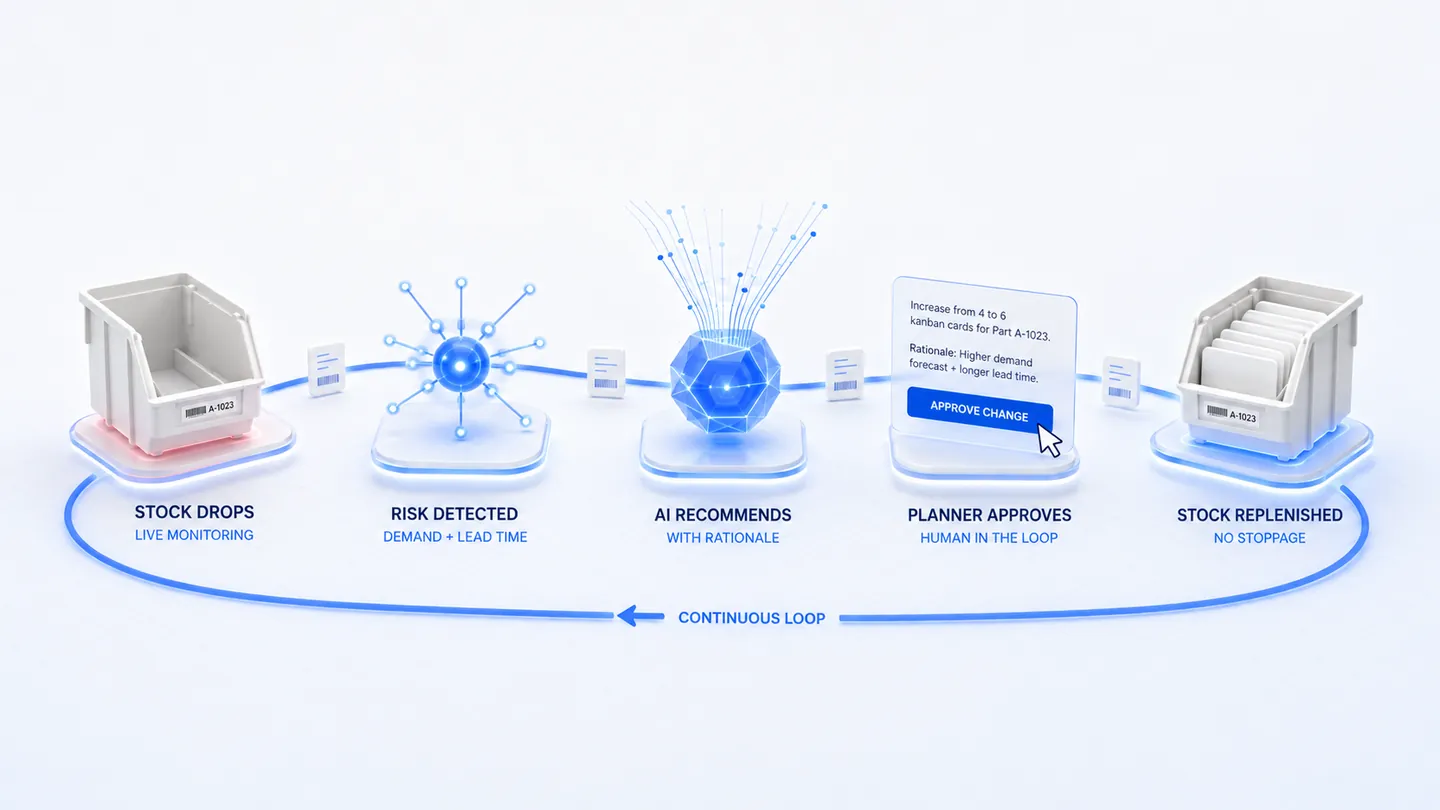
Stockly by Analytos adds AI inventory planning to Oracle without replacing it or moving data out of it. It reads the item, supplier, on-hand and transaction data the Oracle instance already holds, works out where the plan is about to go wrong, and returns approved parameter changes to Oracle — which stays the system of record throughout.
Oracle inventory optimization with Stockly starts read-only: connect the data, confirm Stockly reproduces your current inventory position, then review its recommendations alongside your existing process before any write-back is enabled.
Connected to the ERP you run






Independently listed

Predict it. Recalibrate it. Keep it running.
Illustrative targets- Lower stockout risk
- ~40%Lower stockout risk
- Inventory coverage held
- 98%Inventory coverage held
- Faster buffer correction
- 3×Faster buffer correction
- Less production risk
- ~55%Less production risk
- No rip-and-replace Sits on the ERP you already run
- Continuous, not quarterly Buffers move as conditions move
- Planners stay in control Every action carries its rationale
Not measured customer results — no named customer, study or timeframe stands behind them. For a figure built from your own inventory value, SKU count and planning method, use the ROI estimator.
Reads
What Stockly reads from Oracle
Items and planning parameters
The safety stock, reorder and min/max settings the instance already plans from, per organization.
Suppliers and purchase history
Who supplies each item, the lead time assumed, and the lead time actually achieved on receipt.
On-hand and transactions
Stock positions and movement history, which give real consumption instead of an estimate.
Rollout
Going live on Oracle
Connect read-only
Stockly reads from Oracle. Nothing is written back yet.
Reproduce your position
Confirm Stockly sees the same inventory position your planners do.
Run alongside
Planners review Stockly’s recommendations next to the current process, with the reasoning for each.
Enable write-back
Approved changes start flowing back into Oracle once planners trust what they see.
PFEP
PFEP for Oracle
A Plan For Every Part, kept inside Oracle
Item and organization-level planning data in Oracle can hold the planning side of a PFEP. Stockly keeps those fields current, so the PFEP lives in the system of record rather than beside it.
How Stockly maintains a PFEPMore than one ERP?
Groups that run Oracle alongside other ERPs get one planning view across all of them, with each ERP staying the system of record for its own plants.
Planning across several ERPs
Frequently asked questions
Does Stockly by Analytos work with Oracle?
Yes. Oracle follows the same pattern as the other ERPs Stockly sits on: it reads the item, supplier, on-hand and transaction data the instance holds, and returns approved parameter changes to the fields Oracle already plans from.
Do we have to migrate off Oracle?
No. Oracle stays the system of record for items, orders, suppliers and stock. Stockly holds no system of record of its own.
How is Stockly connected to our Oracle instance?
Through the interfaces your instance exposes, agreed during implementation. It starts read-only; write-back is enabled once your planners are satisfied with the recommendations.
Keep reading
More on Stockly by Analytos
- AI Inventory Planning on Top of Your Existing ERPAI inventory planning on top of the ERP you already run.Read more
- AI Inventory Planning Software for SAPAI inventory planning on SAP, with SAP staying the system of record.Read more
- AI Inventory Planning Software for NetSuiteAI inventory planning on NetSuite, per item and location.Read more
- PFEP Software for SAP, QAD, NetSuite, SYSPRO and InforA Plan For Every Part that stays current, on the ERP you already run.Read more
Ready to Stop Firefighting?
Let AI handle the volatility so your teams can focus on what matters. Book a walkthrough and we'll map Stockly to your workflow.